
What it offers a shop in Saudi Arabia
- Language
- Arabic, with a right-to-left layout, or English, in both apps. This website is also available in Arabic.
- Currency
- Set the shop's currency to SAR in the shop details.
- Tax
- Enter VAT with its rate and your VAT registration number, and choose prices inclusive or exclusive of tax. Item types you choose, such as glasses orders, lenses and contact lenses, can be billed at 0% next to items at the standard rate.
- E-invoicing
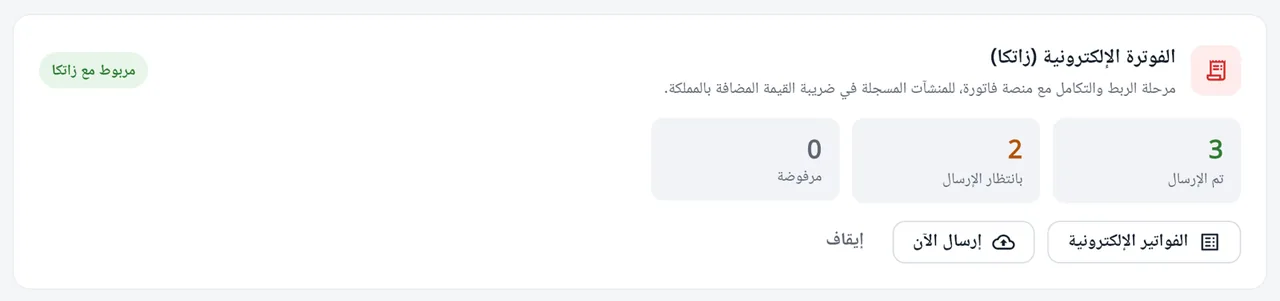
- ZATCA Phase 2 on the Windows desktop (version 6.7.1 or later) and the Android app (version 4.10.0 or later): turn on E-invoicing (ZATCA) in My Shop Profiles, Tax & QR Code on the desktop, or in My Shop, Edit Shop Profile on the phone, enter the legal name, VAT number, CR number and national address, and connect each PC or phone once with its own OTP from the Fatoora portal. Sales, orders and repairs are then signed simplified tax invoices with the ZATCA QR code, reported to ZATCA automatically (on the phone, while the app is open); a business (B2B) invoice is cleared by ZATCA before the sale is saved. Credit and debit notes are made automatically. Included in Desktop Pro and the bundle. VAT, GST and ZATCA e-invoicing
- Receipt QR
- A ZATCA-format QR code, a WhatsApp link to the shop, or none. With e-invoicing on, the desktop receipt carries the signed e-invoice's own ZATCA QR code.
- Receipts
- 57/58 mm and 80 mm thermal rolls, A4 and A5 from the desktop; 80 mm thermal, A4 PDF or an image from the phone.
- Messages
- Receipt, ready-for-pickup and repair messages on WhatsApp in one click, sent from the shop's own number.
- Paying
- The Android plan is paid through Google Play, which shows the price for Saudi Arabia. For Desktop Pro or the bundle, pay by card with Activate now on the pricing page. Plans are not sold inside the iPhone app: a plan bought on the website, Windows or Android also works on the iPhone.
What it does not do
- ZATCA e-invoicing needs the Windows desktop 6.7.1 or later, or the Android app 4.10.0 or later. The Android app sends invoices to ZATCA only while it is open.
- A business (B2B) invoice needs the internet, because ZATCA clears it before the sale is saved.
- It does not tell you your obligations: ask your accountant or ZATCA whether and when your shop must integrate, and which items are zero-rated.
- Stock is managed on the Windows desktop, not on the phone.
What the software does
- Prescriptions per eye (SPH, CYL, AXIS, VA, ADD and IPD) on the same order as the frame, the lenses and the payment. Prescriptions and orders
- Stock for frames, lenses, contact lenses and accessories, with barcodes and low-stock alerts. Stock and inventory
- Counter sales, expenses and cash shifts with X and Z reports. Sales and POS
- Receipts and order messages on WhatsApp from the shop's own number. WhatsApp receipts
- The counter keeps selling when the internet drops, and the records are sent afterwards.
- A Windows desktop program and a phone app for Android and iPhone on one shop account.
The Windows program is free for the first 30 days. Download it, or see the desktop and phone app (Android and iPhone) pages.
Questions
Is Asaan Optics available in Arabic?
Yes. In Arabic the whole desktop program switches to a right-to-left layout, and the Android app is available in Arabic as well.
Does Asaan Optics connect to ZATCA's Fatoora platform (Phase 2)?
Yes, from the Windows desktop (version 6.7.1 or later) and the Android app (version 4.10.0 or later). Turn on E-invoicing (ZATCA) in My Shop Profiles, Tax & QR Code on the desktop, or in My Shop, Edit Shop Profile on the phone, and connect each PC or phone once with its own OTP from the Fatoora portal. Sales, orders and repairs are then issued as signed e-invoices and reported to ZATCA automatically, and business (B2B) invoices are cleared by ZATCA first. On the phone, invoices are sent while the app is open.
Does Asaan Optics support VAT in Saudi Arabia?
Yes. Set VAT with its rate and your VAT number, choose prices inclusive or exclusive of tax, and choose which item types are billed at 0%. Ask your accountant or ZATCA which e-invoicing requirements apply to your shop.
Does it work when the internet is down?
Yes. On the desktop, a sale or order that cannot reach the server waits in a queue on the PC and is sent with the Pending Sync button. With ZATCA e-invoicing on, simplified invoices are still signed and printed offline and are sent to ZATCA when the internet is back, within ZATCA's 24 hours. The Android app saves the record on the phone and sends it when it reconnects; with e-invoicing on, its simplified invoices are signed offline too and sent to ZATCA once the app is open and online.
Related
- VAT, GST and ZATCA e-invoicingGuide
- All featuresOne page per job the software does.
- PricingPlans for the desktop, the phone or both.
- DownloadThe Windows installer, and the phone app for Android and iPhone.
- ComparisonsAsaan Optics next to other optical software.
- Asaan Optics in PakistanLanguage, currency and tax.
- Asaan Optics in IndiaLanguage, currency and tax.
- Asaan Optics in the United StatesLanguage, currency and tax.