What it does
- A repair records the customer, what needs fixing, the total, the advance, the balance, the date and the delivery date.
- Each job gets its own serial number and receipt.
- The screen shows today's repair customers and amount, and recent entries with invoice number and delivery date.
- Repairs are listed in Search Customer next to prescriptions.
- When the order is marked completed, the Spectacle Repair Complete message can go out on WhatsApp by itself.
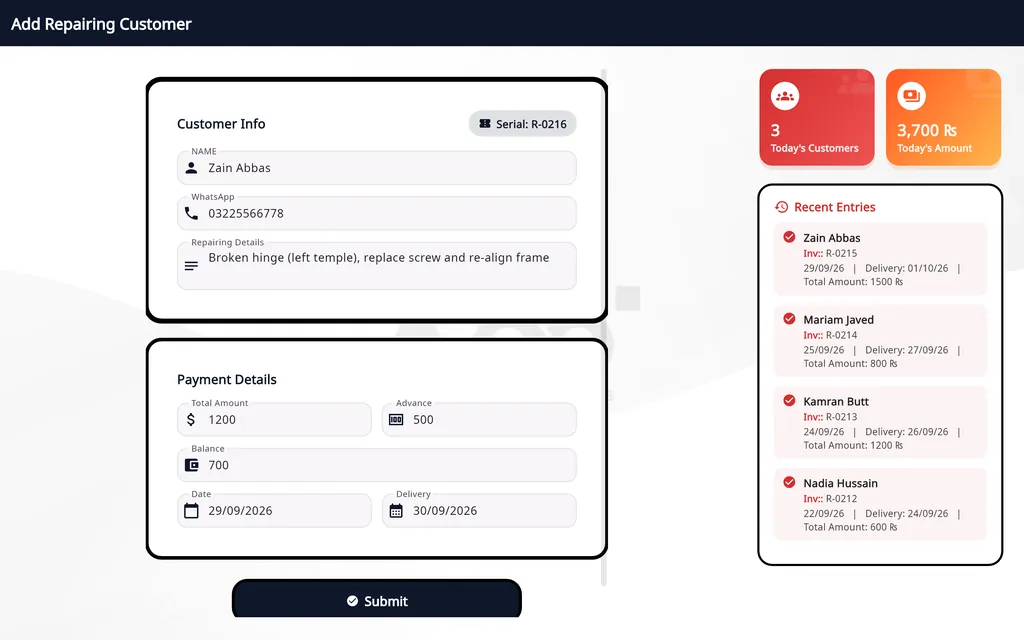
How a repair is recorded
Enter the customer
The customer's name and WhatsApp number, and a description of the repair.
Enter the amounts
The total and the advance; the balance fills in.
Set the delivery date
Then press Submit.
Mark it completed
When the frame is ready, mark the order completed.
On Windows and on Android
- Windows desktop
- The Repairing module, with repairs listed in Search Customer.
- Android app
- Repair jobs are added on the phone too. Repairing Jobs is the second tab of Search Patient, with the balance due and a WhatsApp button on every card.
The plans are compared on the pricing page.
Questions
Does a repair get its own receipt?
Yes. Each repair job has its own serial number and receipt.
How does the customer know the repair is ready?
When the order is marked completed, the Spectacle Repair Complete message can go out on WhatsApp by itself.
Where do I see repairs that are still pending?
In Search Customer, where repairs are listed with prescriptions. On Android they are in the Repairing Jobs tab of Search Patient, with the balance due.
Related
- Prescriptions and ordersBoth eyes, the frame, the lenses and the payment on one order, with several pairs on one bill.
- Stock and inventoryFrames, lenses, contact lenses and accessories with barcodes, minimum levels, stock value and vendor ledgers.
- Sales and POSCounter sales by barcode or search, discounts, payment types, expenses, receipts and exports.
- WhatsApp receipts and remindersOrder confirmation, ready-for-pickup, completed and repair messages from the shop's own WhatsApp number.
- Barcode labelsPrint labels for frames, lenses and contact lenses and scan them at the counter.
- Staff shifts and auditShifts with a blind cash count, X and Z reports, manager PINs, staff logins and a staff audit.
- VAT, GST and ZATCA-format QRYour own tax label, rate and registration number, prices with or without tax, and a QR code on receipts.
- Asaan Optics DesktopEvery screen of the Windows software.
- PricingPlans for the desktop, the phone or both.
- DownloadThe Windows installer and the Android app.