What it does
- Both eyes on one form: SPH, CYL, AXIS and VA, ADD for each side and the IPD. Same as Right copies the right eye to the left.
- The frame and lenses are picked from stock by search or barcode, or typed as custom details.
- Several pairs on one bill. Each pair keeps its own frame, lenses, price and remarks.
- Lab work: switch on Outsource to Vendor / Lab and enter the lab cost. A bill goes to that vendor's ledger.
- Discount, advance, payment type and delivery date are on the same screen, and the balance is worked out as you type.
- Search Customer lists prescriptions and repairs together. Search by name, contact, serial, doctor or remarks, or filter by balance to see who still owes money.
- Receipts print on a 57 mm or 80 mm thermal roll, A4 or A5. Show Eye Exam adds the prescription to the receipt.
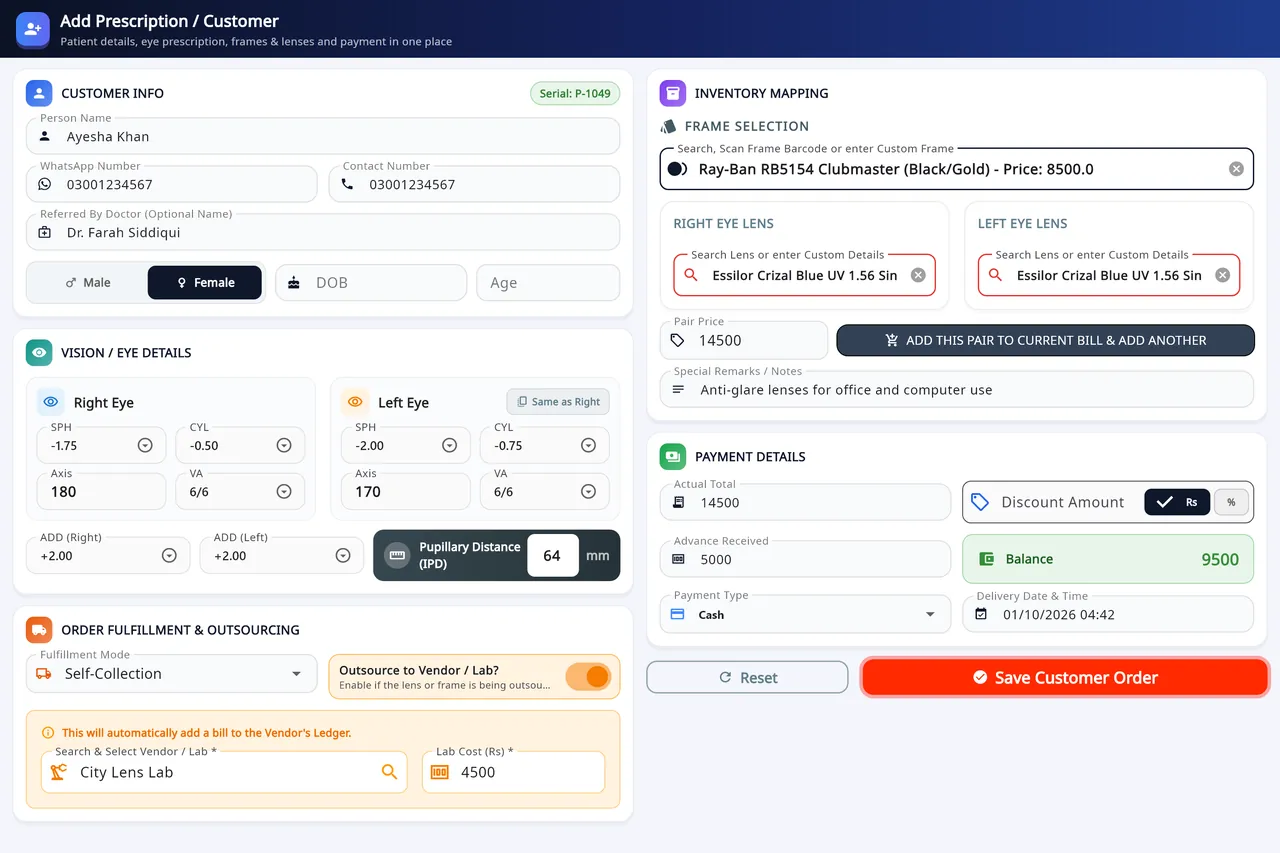
How an order is taken
Enter the customer
Name, WhatsApp and contact number, referring doctor, gender, date of birth or age.
Type both eyes
SPH, CYL, AXIS and VA, ADD for each side and the IPD.
Pick the frame and lenses
Search or scan the frame's barcode, then pick the right and left lenses from stock, or type custom details.
Add another pair
For another pair on the same bill, press Add this pair to current bill & add another. Pairs already added can still be edited.
Send it to a lab
If a lab makes the lenses, switch on Outsource to Vendor / Lab and enter the lab cost.
Take the payment
Enter the discount, advance, payment type and delivery date, then Save Customer Order.
On Windows and on Android
- Windows desktop
- The whole order on one wide form, with a USB barcode scanner and the receipt printer.
- Android app
- Scan Prescription photographs the slip and fills SPH, CYL, AXIS and ADD with Google ML Kit text recognition on the phone. You check every value before saving. Search Patient can also open a record from the QR code on a receipt.
The plans are compared on the pricing page.
Questions
Which prescription values does Asaan Optics store?
For each eye: SPH, CYL, AXIS and VA, with ADD for each side and the IPD. They are saved with the order, next to the frame, the lenses and the payment.
Can one order have more than one pair of glasses?
Yes. Press Add this pair to current bill & add another. Each pair keeps its own frame, lenses, price and remarks, and pairs already added can still be edited.
Can the software read a written prescription?
On Android, yes. Tap Scan Prescription on the Add Customer screen, photograph the slip and crop it to the numbers table. Google ML Kit text recognition reads it on the phone and fills the fields. You check and correct each value before saving. The desktop app does not have a scanner.
How do I find a customer's earlier prescription?
Open Search Customer and search by name, contact number, serial, doctor or remarks. On Android, Search Patient can also scan the QR code on the customer's receipt to open the record.
Related
- Stock and inventoryFrames, lenses, contact lenses and accessories with barcodes, minimum levels, stock value and vendor ledgers.
- Sales and POSCounter sales by barcode or search, discounts, payment types, expenses, receipts and exports.
- WhatsApp receipts and remindersOrder confirmation, ready-for-pickup, completed and repair messages from the shop's own WhatsApp number.
- Barcode labelsPrint labels for frames, lenses and contact lenses and scan them at the counter.
- Staff shifts and auditShifts with a blind cash count, X and Z reports, manager PINs, staff logins and a staff audit.
- VAT, GST and ZATCA-format QRYour own tax label, rate and registration number, prices with or without tax, and a QR code on receipts.
- Repair jobsA serial number and a receipt for every repair, with the advance, the balance and the delivery date.
- Asaan Optics DesktopEvery screen of the Windows software.
- PricingPlans for the desktop, the phone or both.
- DownloadThe Windows installer and the Android app.
- How to read an eye prescriptionGuide
- Glossary of optical termsGuide