What it does
- Link the shop's WhatsApp number once, with a pairing code or a QR scan, and send a test message.
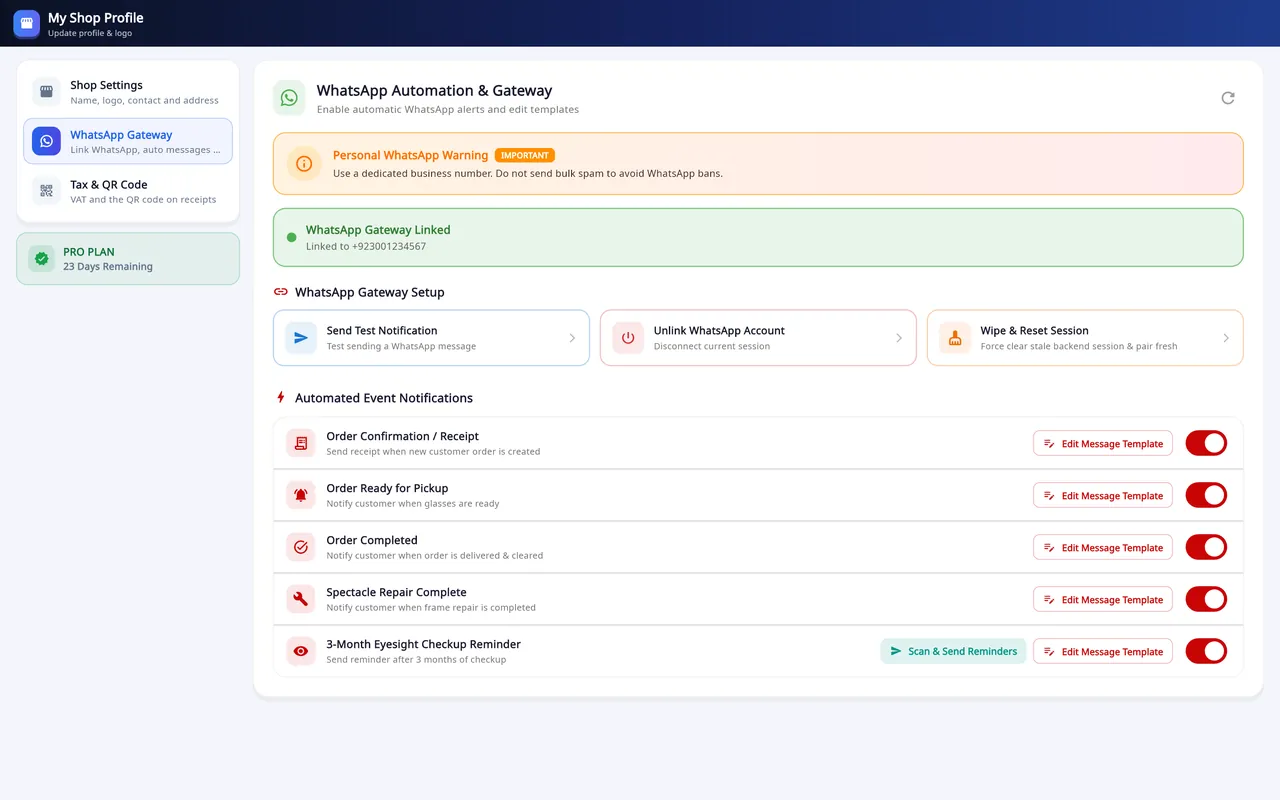
- Automatic messages on the desktop: receipt, ready for pickup, completed, repair complete and a 3-month checkup reminder.
- Each message has an editable template with placeholders such as {customer_name} and {balance_amount}. The Android app shows a live preview of what the customer will read.
- A pickup reminder can be sent from the customer's row in Search Customer.
- If the link is down, the WhatsApp button on a record still opens the chat with the message written.
- Use a dedicated business number: the app warns against bulk messages, which can get a number banned by WhatsApp.
How it is set up
Open the WhatsApp Gateway
On the desktop it is a tab in My Shop Profiles.
Link the shop's number
Pair it with a code or a QR scan.
Send the test message
It confirms that the link works.
Choose the messages
Switch each automatic message on or off and edit its template.
On Windows and on Android
- Windows desktop
- Receipt, ready for pickup, completed, repair complete and a 3-month checkup reminder, each with an editable template.
- Android app
- Order confirmation, ready-for-pickup, order-completed and repair messages, each with its own switch and template and a live preview.
The plans are compared on the pricing page.
Questions
Which WhatsApp messages does Asaan Optics send automatically?
The order confirmation or receipt, a ready-for-pickup message, an order-completed message and a repair-complete message. The desktop app also has a 3-month checkup reminder. Each one can be switched off.
Can I change the wording of the messages?
Yes. Each message has an editable template with placeholders such as {customer_name} and {balance_amount} that fill in for each customer.
What if WhatsApp is not linked?
The WhatsApp button on a record still opens the chat with the message written, so you can send it yourself.
Should I use my personal number?
Use a dedicated business number. The app warns against bulk messages, which can get a number banned by WhatsApp.
Related
- Prescriptions and ordersBoth eyes, the frame, the lenses and the payment on one order, with several pairs on one bill.
- Stock and inventoryFrames, lenses, contact lenses and accessories with barcodes, minimum levels, stock value and vendor ledgers.
- Sales and POSCounter sales by barcode or search, discounts, payment types, expenses, receipts and exports.
- Barcode labelsPrint labels for frames, lenses and contact lenses and scan them at the counter.
- Staff shifts and auditShifts with a blind cash count, X and Z reports, manager PINs, staff logins and a staff audit.
- VAT, GST and ZATCA-format QRYour own tax label, rate and registration number, prices with or without tax, and a QR code on receipts.
- Repair jobsA serial number and a receipt for every repair, with the advance, the balance and the delivery date.
- Asaan Optics DesktopEvery screen of the Windows software.
- PricingPlans for the desktop, the phone or both.
- DownloadThe Windows installer and the Android app.