What it does
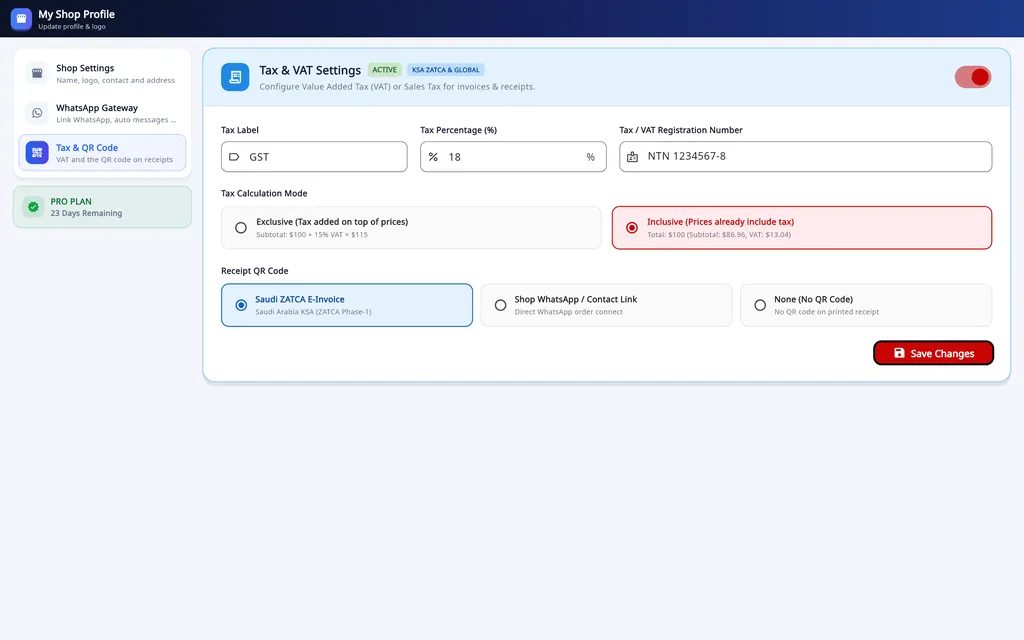
- A tax label, a rate and a registration number of your own.
- Tax added to prices, or already included in them.
- Applied to counter sales and to prescription orders.
- The receipt QR code: a ZATCA-format e-invoice QR, a link to the shop's WhatsApp, or none.
- Currency and country code are set with the shop's details.
- Included in the Mobile App, Desktop Pro and bundle plans.
How it is set up
Open Tax & QR Code
On the desktop it is a tab in My Shop Profiles.
Enter the tax
Its label (VAT, GST or sales tax), its rate and your registration number.
Choose the price style
Tax added to prices, or prices that already include it.
Choose the receipt QR code
A ZATCA-format QR code, a WhatsApp link to the shop, or none.
On Windows and on Android
- Windows desktop
- Tax and the receipt QR code are set in My Shop Profiles and printed on every receipt size.
- Android app
- VAT or GST and the ZATCA-format receipt QR are included in the Android app as well.
The plans are compared on the pricing page.
Questions
Does Asaan Optics support VAT in Saudi Arabia?
You can set VAT with its rate and your registration number and print a ZATCA-format QR code on receipts. Asaan Optics does not connect to ZATCA's Fatoora platform, so ask your accountant which e-invoicing requirements apply to your shop.
Can I use GST or another tax?
Yes. The tax has your own label, rate and registration number, so it can be VAT, GST or sales tax.
Can prices include tax?
Yes. Choose whether tax is added to prices or already included in them.
Related
- Prescriptions and ordersBoth eyes, the frame, the lenses and the payment on one order, with several pairs on one bill.
- Stock and inventoryFrames, lenses, contact lenses and accessories with barcodes, minimum levels, stock value and vendor ledgers.
- Sales and POSCounter sales by barcode or search, discounts, payment types, expenses, receipts and exports.
- WhatsApp receipts and remindersOrder confirmation, ready-for-pickup, completed and repair messages from the shop's own WhatsApp number.
- Barcode labelsPrint labels for frames, lenses and contact lenses and scan them at the counter.
- Staff shifts and auditShifts with a blind cash count, X and Z reports, manager PINs, staff logins and a staff audit.
- Repair jobsA serial number and a receipt for every repair, with the advance, the balance and the delivery date.
- Asaan Optics DesktopEvery screen of the Windows software.
- PricingPlans for the desktop, the phone or both.
- DownloadThe Windows installer and the Android app.