
What it does
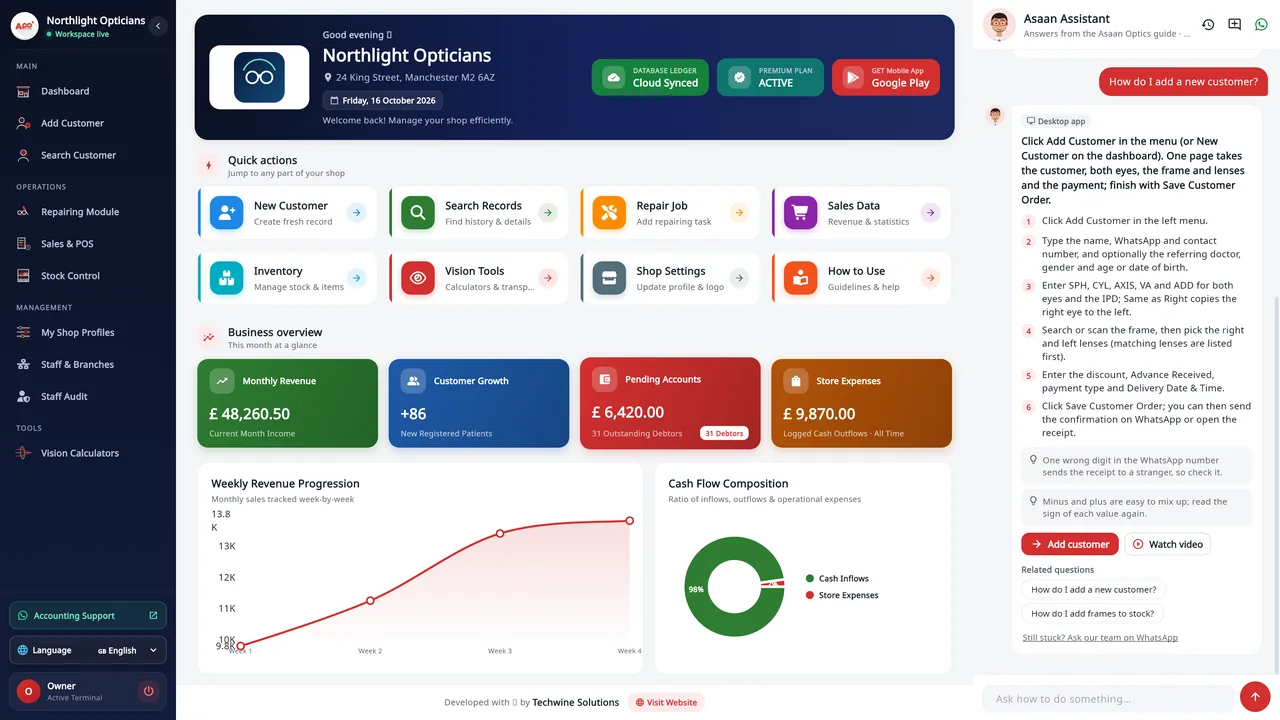
- Answers how-to questions about the desktop and the phone app: customers, orders, receipts, repairs, sales, stock, staff, calculators, plans and settings.
- Understands the 9 app languages and Roman Urdu, for example: naya customer kaise add karun.
- Each answer has numbered steps, tips, a button that opens the right screen and, where there is one, the video tutorial.
- Looks up a customer by name or phone and shows today's sales, for the people allowed to see them.
- Changes simple settings, such as the language, the currency or the tax, after you confirm.
- Shows your plan and when it ends, and how to renew.
- When the guide has no answer, it offers our team on WhatsApp.
How to use it
Open AI Support
On Windows it is in the left menu and opens beside your screen. On Android it is a card on the home screen.
Ask in your own words
Type the question in any of the app's languages or in Roman Urdu, or pick a topic.
Follow the steps
Press the button under the answer to open the screen it talks about.
On Windows and on Android
- Windows desktop
- AI Support in the left menu, as a panel beside the screen you are working on. Without a plan it answers 5 questions a day; with a plan there is no limit.
- Android app
- AI Support is a card on the home screen, with the same guide and actions.
The plans are compared on the pricing page.
Questions
Is AI Support a paid AI service?
No. It answers from the Asaan Optics guide built into the app, so there is no extra charge and the how-to answers work without internet. Looking up customers and sales needs a connection, as the rest of the app does.
Which languages does it understand?
The app's 9 languages (English, Urdu, Arabic, Hindi, Turkish, German, Spanish, French and Portuguese) and Roman Urdu.
Can staff use it?
Yes. Staff get answers for the screens they are allowed to open, and customer lookups only if they may search customers.
What if it cannot answer?
It says so and offers to continue with our team on WhatsApp.
Is it free?
On the desktop without a plan it answers 5 questions a day; with a plan it has no limit.
Related
- Prescriptions and ordersBoth eyes, the frame, the lenses and the payment on one order, with several pairs on one bill.
- Stock and inventoryFrames, lenses, contact lenses and accessories with barcodes, minimum levels, stock value and vendor ledgers.
- Sales and POSCounter sales by barcode or search, discounts, payment types, expenses, receipts and exports.
- WhatsApp receiptsOne click opens the customer's WhatsApp chat with the receipt, ready-for-pickup or completed message already written.
- Barcode labelsPrint labels for frames, lenses and contact lenses and scan them at the counter.
- Staff shifts and auditShifts with a blind cash count, X and Z reports, manager PINs, staff logins and a staff audit.
- VAT, GST and ZATCA-format QRYour own tax label, rate and registration number, prices with or without tax, and a QR code on receipts.
- Repair jobsA serial number and a receipt for every repair, with the advance, the balance and the delivery date.
- Multi-branch (My Branches)See every branch's sales, bills and low stock in one place, and enter any branch with full control.
- Eye examination (screening)Record a patient's eye examination on Android with distance and near vision, pinhole, colour and Amsler grid screening.
- Asaan Optics DesktopEvery screen of the Windows software.
- PricingPlans for the desktop, the phone or both.
- DownloadThe Windows installer and the Android app.
- Video tutorialsGuide