What it does
- A shift opens with an opening float. Bills, expenses and cash in or out are recorded against the person on shift.
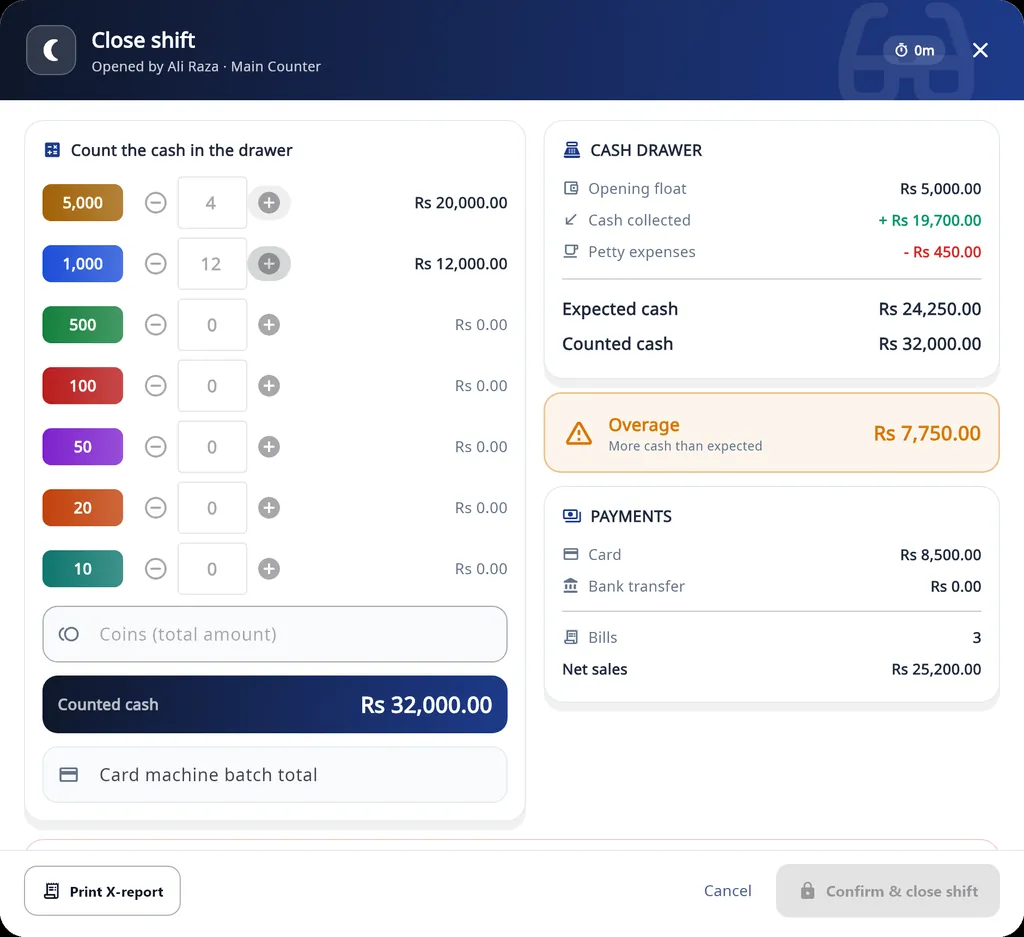
- Blind close: staff count the drawer note by note, plus coins and the card batch total. The expected amount appears only after their count.
- An X-report at any time and the Z-report at close, on 58 mm or 80 mm paper.
- A manager override PIN for a discount above a staff member's limit and for cash taken out of the drawer.
- Staff logins with their own email and password, and Screen Access Permissions for Dashboard, Add Customer, Search Customer, Repairing, POS and Stock Control.
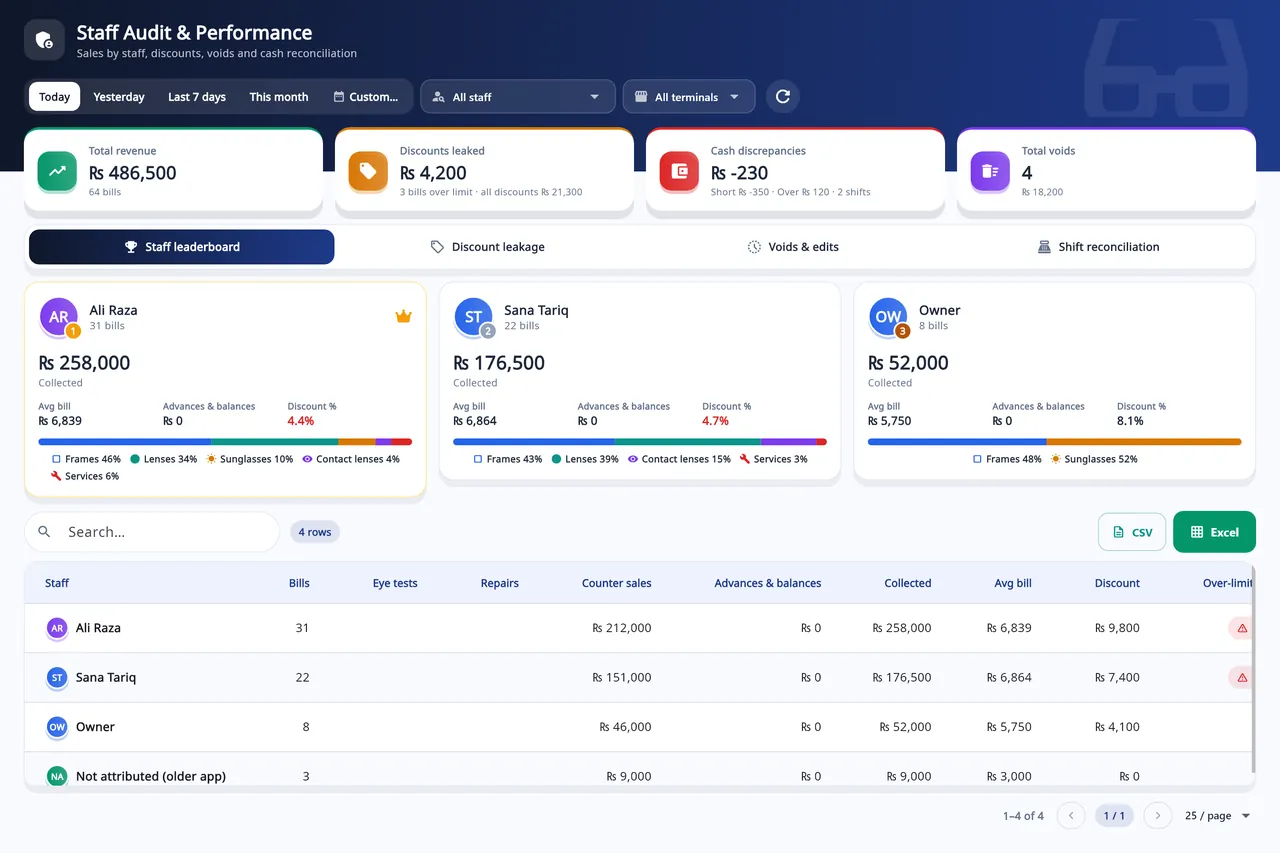
- Staff Audit: revenue, discounts over the limit, cash discrepancies and voids, with a staff leaderboard. Flagged items can be approved or rejected, and the data exports to CSV or Excel.
- Shifts and the till are kept in a local SQLite database on the PC, so the counter keeps selling when the internet drops.
How a shift runs
Open the shift
Count the opening float.
Sell
Bills, expenses and cash in or out are recorded against the person on shift.
Close the shift
Count the drawer note by note. Staff count blind: the expected amount appears only after their count.
Print the reports
An X-report at any time and the Z-report at close, on 58 mm or 80 mm paper.
On Windows and on Android
- Windows desktop
- Shifts, the cash drawer, staff logins with permissions and Staff Audit are all here.
- Android app
- Shifts, the cash drawer and Staff Audit are not part of the phone app.
The plans are compared on the pricing page.
Questions
How do staff logins keep revenue figures private?
Each staff member signs in with their own email and password, and the owner ticks the screens they may open, for example the point of sale but not Stock Control or the dashboard. On the point of sale, staff do not see the expected drawer amount until they have counted it. A discount above their limit, or cash taken out of the drawer, needs the owner's or a manager's PIN, and Staff Audit shows discounts, voids and cash differences per person.
What is a blind cash count?
Staff count the drawer before the program shows what it expected. The expected amount appears only after their count, and the difference is saved with the shift.
When are the X and Z reports printed?
An X-report can be printed at any time during a shift, and the Z-report is printed when the shift is closed. Both print on 58 mm or 80 mm paper.
Can I run multiple optical branches from a single account?
One shop account can have several counters and staff logins. Shifts are kept per counter, and Staff Audit can be filtered by staff member and by terminal. Stock is one list for the account: the desktop app does not keep separate stock per branch or move stock between branches.
Related
- Prescriptions and ordersBoth eyes, the frame, the lenses and the payment on one order, with several pairs on one bill.
- Stock and inventoryFrames, lenses, contact lenses and accessories with barcodes, minimum levels, stock value and vendor ledgers.
- Sales and POSCounter sales by barcode or search, discounts, payment types, expenses, receipts and exports.
- WhatsApp receipts and remindersOrder confirmation, ready-for-pickup, completed and repair messages from the shop's own WhatsApp number.
- Barcode labelsPrint labels for frames, lenses and contact lenses and scan them at the counter.
- VAT, GST and ZATCA-format QRYour own tax label, rate and registration number, prices with or without tax, and a QR code on receipts.
- Repair jobsA serial number and a receipt for every repair, with the advance, the balance and the delivery date.
- Asaan Optics DesktopEvery screen of the Windows software.
- PricingPlans for the desktop, the phone or both.
- DownloadThe Windows installer and the Android app.