What it does
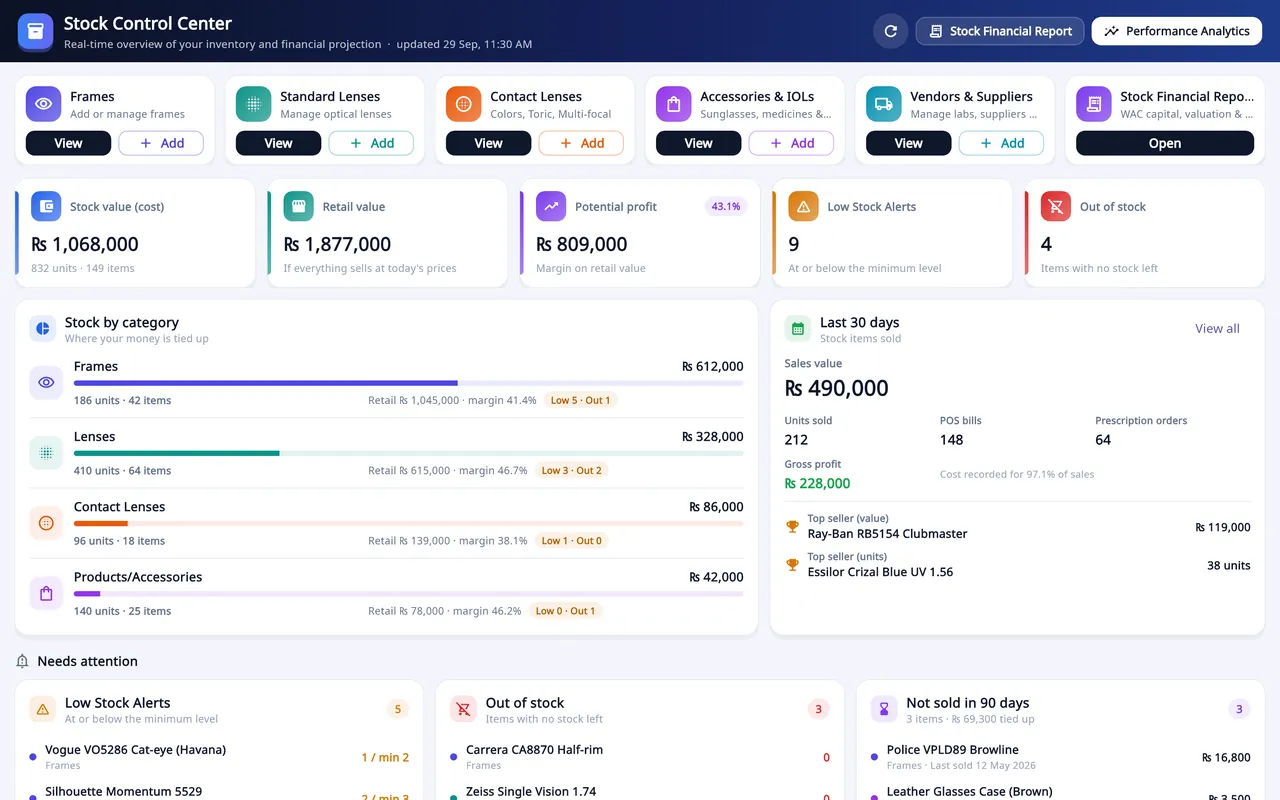
- Categories: frames, standard lenses, contact lenses, accessories, vendors and a financial report.
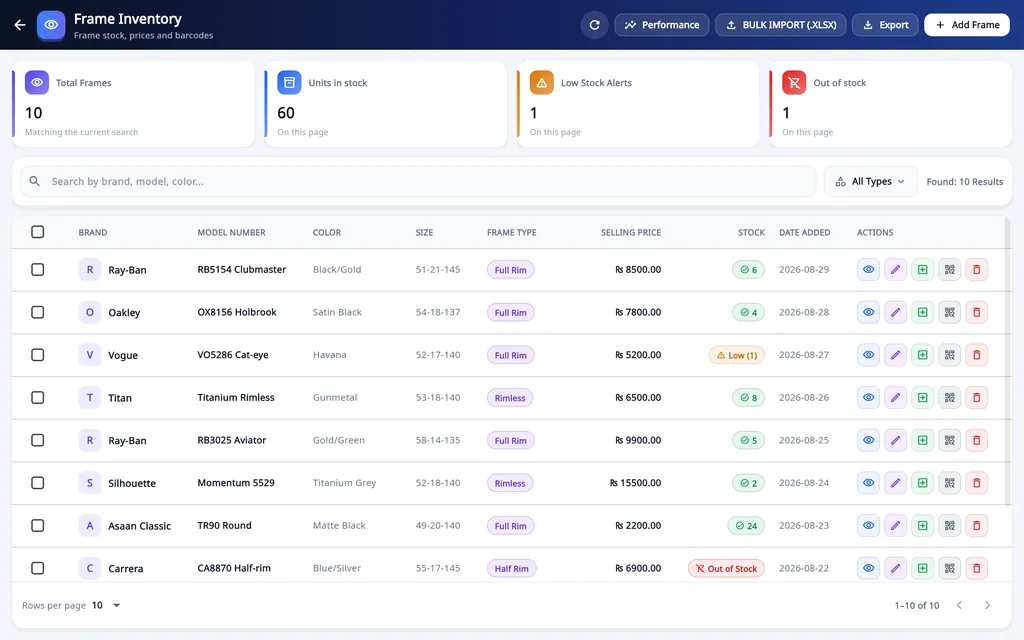
- Frames carry brand, model number, colour, size, frame type, shape, gender, minimum stock, barcode and price. Lenses carry type and power; contact lenses add base curve, diameter and expiry date.
- Stock value at cost and at retail, and the potential profit.
- Needs attention: low stock, out of stock, and items not sold in 90 days.
- The last 30 days: sales value, units, gross profit and top sellers.
- Bulk import from an .xlsx sheet, and export.
- Vendors & Suppliers: purchase bills and payments with the balance due. An outsourced order adds a bill to the lab's ledger.
- Reports: Product Performance Analytics, and a Stock Financial Report with realised sales, cost of goods sold and unsold stock at cost and at retail.
How stock is kept
Add the items
Add items one at a time, or import a spreadsheet with Bulk Import (.xlsx).
Print the labels
Print barcode labels in the size of your label roll, from 38 × 25 mm frame labels to 70 × 12 mm temple labels, or a custom size.
Set a minimum
Give each item a minimum stock. At that level it shows under Low Stock Alerts.
Sell from it
At the counter, scan the label to put the item on the bill. The stock goes down when the order or sale is saved.
On Windows and on Android
- Windows desktop
- Stock, vendors, barcode labels and stock reports are managed here.
- Android app
- The phone sells from that stock with Scan Barcode or Add from Inventory, and each sale takes the items off the stock on the server. Stock itself is not managed on the phone.
The plans are compared on the pricing page.
Questions
Why do optical shops need stock and vendor management?
When a frame or lens is picked from stock on an order or a counter sale, its stock goes down, so the lists show what is really on the shelf. Items at their minimum level show as low stock, and the Stock Control Center lists what has not sold in 90 days. When a job goes to a lab, the lab cost is added as a bill to that vendor's ledger, so you can see what you owe each lab.
Can I manage stock from the phone?
No. Frames, lenses and other stock are managed in the Windows desktop app. The phone sells from that stock with Scan Barcode or Add from Inventory, and each sale takes the items off the stock on the server.
Can I import my existing stock list?
Yes. Items can be added one at a time or imported from an .xlsx spreadsheet with Bulk Import, and the list can be exported.
Does it keep separate stock for each branch?
No. Stock is one list for the account: the desktop app does not keep separate stock per branch or move stock between branches.
Related
- Prescriptions and ordersBoth eyes, the frame, the lenses and the payment on one order, with several pairs on one bill.
- Sales and POSCounter sales by barcode or search, discounts, payment types, expenses, receipts and exports.
- WhatsApp receipts and remindersOrder confirmation, ready-for-pickup, completed and repair messages from the shop's own WhatsApp number.
- Barcode labelsPrint labels for frames, lenses and contact lenses and scan them at the counter.
- Staff shifts and auditShifts with a blind cash count, X and Z reports, manager PINs, staff logins and a staff audit.
- VAT, GST and ZATCA-format QRYour own tax label, rate and registration number, prices with or without tax, and a QR code on receipts.
- Repair jobsA serial number and a receipt for every repair, with the advance, the balance and the delivery date.
- Asaan Optics DesktopEvery screen of the Windows software.
- PricingPlans for the desktop, the phone or both.
- DownloadThe Windows installer and the Android app.
- How to manage optical inventory: frames, lenses and contact lensesGuide