Most used calculators
Each tile shows what its calculator gives for the worked example on its own page. Open one and enter your own values.
- Prescription
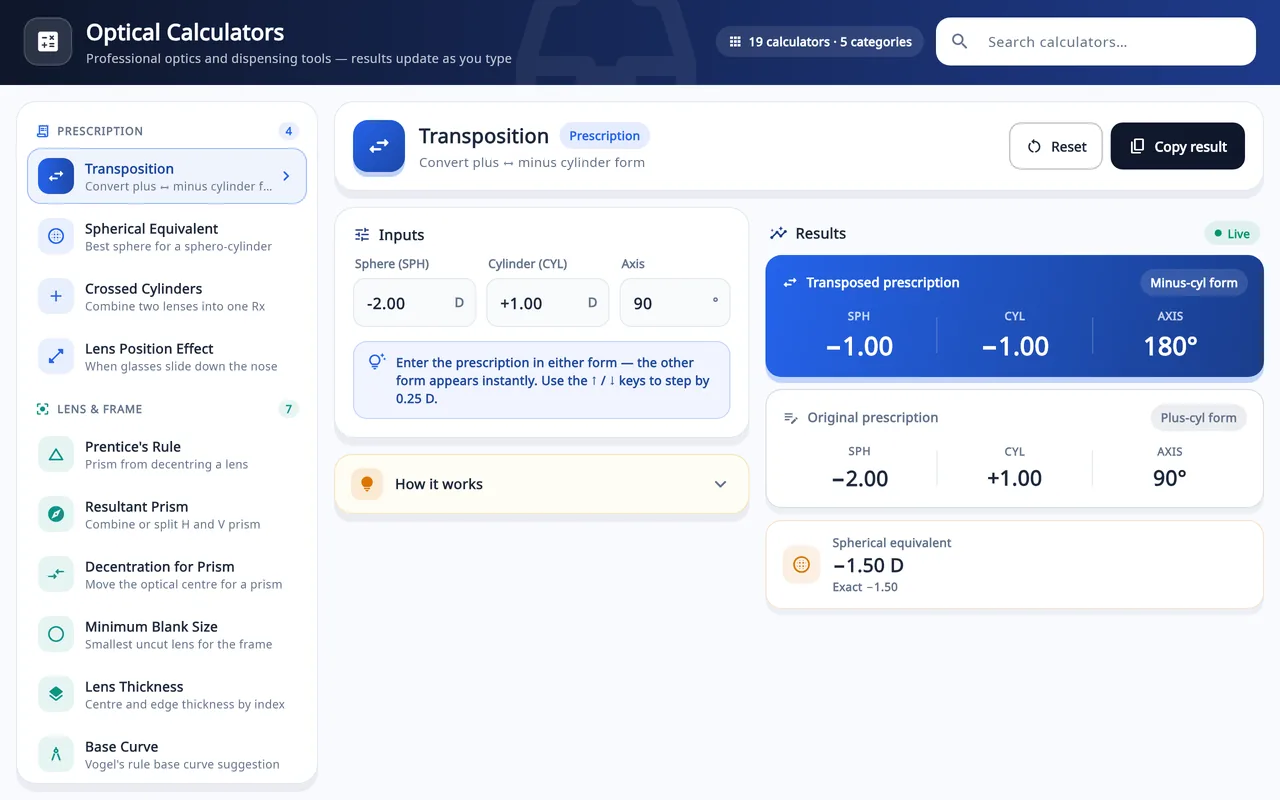
Transposition calculator
Both eyes between plus and minus cylinder, with the spherical equivalent.
Open calculatorNew SPH = SPH + CYLNew CYL = −CYLAxis ± 90°
WrittenCalculator givesSE+2.00 / +1.50 × 45+3.50 / −1.50 × 135+2.75+4.00 / −1.50 × 120+2.50 / +1.50 × 30+3.25−1.25 / −0.75 × 180−2.00 / +0.75 × 90−1.63 - Prescription
Spherical equivalent calculator
One sphere power per eye: sphere plus half the cylinder.
Open calculatorSE = SPH + CYL ÷ 2
- OD
- −4.00 / −0.50 × 180
- SE
- −4.25 D
- Contact lens
Vertex distance calculator
Power at a new lens position: spectacles to contact lens, or frame to frame.
Open calculatorFnew = F ÷ (1 − d × F)
- Spectacles
- −8.00 D at 12 mm
- Cornea
- −7.30 D
- Order
- −7.25 D
- Prescription
Plus to minus cylinder converter
One eye in the other cylinder form, with the working shown.
Open calculator+1.50 +2.00 × 75
- SPH +1.50 + 2.00 = +3.50
- CYL −2.00
- Axis 75 + 90 = 165
+3.50 −2.00 × 165°
- Lens and frame
Lens thickness calculator
Edge and centre thickness and weight by index and frame size.
Open calculatorEdge at −5.00 D, 52□18, PD 64
- Lens and frame
Minimum blank size calculator
The smallest uncut blank that covers the frame after decentration.
Open calculator- Frame
- 52□18, ED 52
- PD
- 64 mm
- Minimum
- 60 mm
- 65 mm blank
- Will cut out
Prescription
For rewriting or reducing a prescription that has already been measured.
- Open calculator
Distance to reading Rx converter
Reading and computer prescriptions from a distance Rx and an ADD.
−2.00 −0.75 × 180, ADD +2.00 gives reading +0.00 −0.75 × 180
- Open calculator
Crossed cylinders calculator
Two cylinders at different axes combined into one prescription.
pl −2.00 × 180 with −0.50 × 30 gives −0.10 −2.29 × 5
Lens and frame
For choosing a blank, checking a frame and predicting how a finished lens will behave.
- Open calculator
Prentice's rule calculator
Prism when the eye looks through a lens away from its optical centre.
−4.00 D, 5 mm inward gives 2.00 Δ base out
- Open calculator
Compounding prism calculator
Horizontal and vertical prism combined into one, with its base angle.
4.00 Δ out, 3.00 Δ up gives 5.00 Δ at 36.9°
- Open calculator
Oblique meridian power calculator
Power of a sphero-cylinder along any meridian.
−2.00 −4.00 × 180, meridian 45 gives −4.00 D
- Open calculator
Lens tilt and wrap calculator
Sphere and cylinder change from pantoscopic tilt and face-form wrap.
−4.00 D, 20° wrap gives −0.53 D cylinder
- Open calculator
Surface curve calculator
True surface power from a 1.530 lens clock or tool curve.
6.00 D on a 1.586 lens gives 6.63 D true curve
Low vision
Reference calculations for low vision aids. They are estimates, not an assessment.
- Open calculator
Low vision magnification calculator
Starting ADD, magnification and working distance from distance acuity.
20/80, 1M print gives +4.00 D, 1.0x at 25.0 cm
- Open calculator
Telescope calculator
Magnification and tube length of Galilean and Keplerian telescopes.
+10 D and −20 D gives 2.0x Galilean, 5.0 cm
No calculator matches. Try a shorter word, or choose All.
Guides
Background reading for the numbers these calculators take.
Before you use a result
- Enter values as they are written on the prescription, with their signs. Powers are in dioptres, lengths in millimetres and axes from 1 to 180 unless a page says otherwise.
- Results are rounded for display. Lenses are ordered in 0.25 D steps, so round to the step your supplier works in.
- The calculators run in your browser and do arithmetic on the numbers you type. They do not examine an eye or replace a qualified practitioner; check a result before it is used to order or dispense a lens. Medical and calculation disclaimer.
The same calculations, inside the shop software
Asaan Optics is optical shop software for Windows and Android. It keeps prescriptions, billing, stock and repair jobs together, and both apps include a set of optical calculators.
Watch: the calculators inside the Asaan Optics desktop app
This video is a tour of the calculators built into the desktop app, not of the web calculators listed on this page. The two lists overlap, but they are not the same.
Video, 1 min 41 s
This is a tour of the optical calculators for opticians built into Asaan Optics: nineteen of them, in five groups, from transposition to pricing and margin. You see how to find one with the search box, type your own values and read the result as it updates, using a spherical equivalent example (sphere -3.00, cylinder -1.00, giving -3.50 D).
Chapters
- 00:00Open Vision Calculators
- 00:26Search and enter values
- 00:51Read, copy and reset
What the video covers
- Where Vision Calculators is in the menu, and the five groups: Prescription, Lens and Frame, Contact Lens, Vision and Age, Shop and Business
- How the search box narrows the list as you type
- Why the minus sign must be typed: a number without a sign is read as plus
- A spherical equivalent example: -3.00 with -1.00 cylinder gives -3.50 D, the sphere plus half the cylinder
- What How it works, Copy result and Reset do in every calculator
Transcript
Find and use any of the optical calculators in Asaan Optics. Asaan Optics has nineteen optical calculators built in.
In the menu, open Vision Calculators. They are listed on the left, in five groups. Prescription, and Lens and Frame. Then Contact Lens, Vision and Age, and Shop and Business.
Type a word in the search box. The list narrows as you type. Click Spherical Equivalent to open it.
Each calculator opens with example values. Type your own: sphere minus three, cylinder minus one. Type the minus sign for a minus power. Without a sign, the number is read as plus.
The result changes as you type. The spherical equivalent is minus three point five zero dioptres: the sphere, plus half the cylinder. How it works shows the formula. Copy result puts the answer on the clipboard. Reset brings back the example values. Four more videos cover them in detail: prescription maths, lens ordering, prism and near vision, and contact lenses and more. These tools support your professional judgement. They do not replace it. Search, open, type your values, and read the result.