How to read this release log
This page lists changes to Asaan Optics by version, newest first. A release has a date only where we have a record of it. Where the date was not recorded, the entry says so instead of guessing. Features that are planned but not released are not listed here.
Asaan Optics has two parts that share one shop account: a desktop program for Windows 10 and 11, and an Android app. They are released separately, so they are listed separately below.
| Version | Platform | Released |
|---|---|---|
| 6.6.0 | Windows desktop | 29 September 2026 |
| 6.3.0 | Windows desktop | Date not recorded; current version in July 2026 |
| Earlier releases | Windows desktop | Dates not recorded |
Desktop 6.6.0, released 29 September 2026
The largest desktop release so far. It adds cash control at the counter and financial reporting on stock, and redesigns the screens used most often. It is published as a required update for older desktop versions.
Staff shifts and the cash drawer
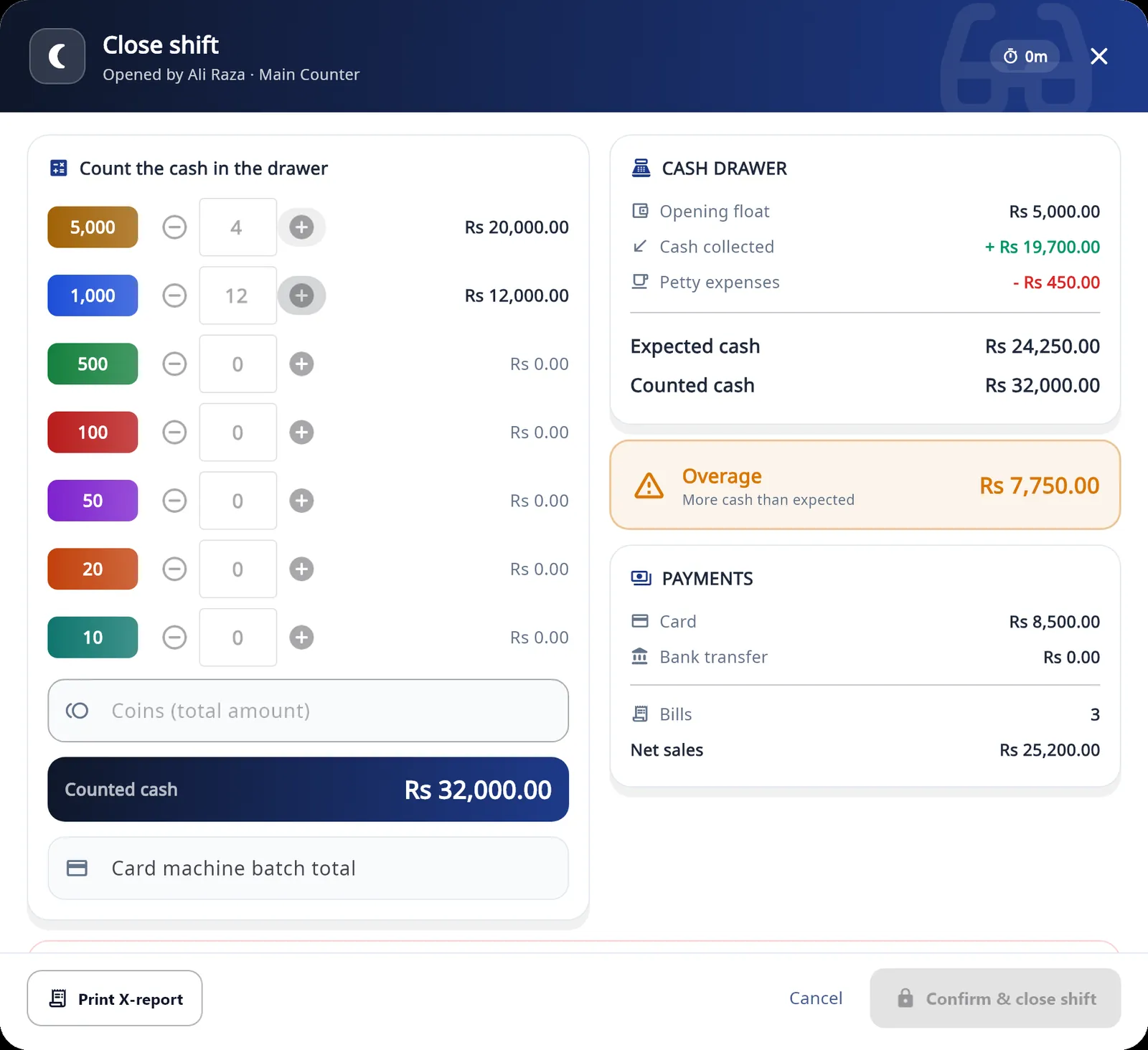
- Each counter now works in shifts. A shift opens with a counted opening float and records sales, expenses and cash in or out against the person on shift.
- At close, the drawer is counted note by note. Staff count without seeing the expected amount, which appears only after their count.
- An X report can be printed during the shift and a Z report at close, on 58 mm or 80 mm paper.
- A discount above a staff member's limit, or cash taken out of the drawer, needs the owner's or a manager's PIN.
- Staff Audit shows bills, counter sales, discounts, voids and cash differences per person, and can be exported.
Stock Control Center
- A new opening screen for stock shows stock value at cost and at retail, and the potential profit.
- A 30 day summary shows sales value, units, gross profit and top sellers.
- "Needs attention" lists low stock, out of stock and items not sold in 90 days.
- Product Performance Analytics lists each item with units, sales value, cost, profit, margin, stock left and the date it last sold.
- The Stock Financial Report shows realised sales, cost of goods sold and profit, and unsold stock per category, with export to PDF.
How to use these screens in daily stock work is covered in how to manage optical inventory.
Orders and customers
- One prescription order can now hold several pairs. Each pair keeps its own frame, lenses, price and remarks, and pairs already added can still be edited.
- The Add Customer and Edit Customer screens were redesigned.
- Search Customers has a new layout.
Dashboard, sales and calculators
- New dashboard and sidebar. The sidebar lists every module of the program.
- The Sales screen opens on today's sales, and Excel and PDF exports contain what the current filter shows.
- 19 optical calculators are built into the program, in five groups. The same calculators are free to use on this site under optical tools.
Offline sync
- Sending records that were saved without a connection is more reliable. What works offline and how records are sent is explained in how offline billing works.
Desktop 6.3.0
The release date of 6.3.0 was not recorded. It was the current desktop version in July 2026.
- The program became available in eight languages: English, Spanish, Arabic, French, Portuguese, Urdu, Turkish and Hindi. Arabic and Urdu switch the whole program to a right-to-left layout.
- A language selector was added.
- A Help Center and user guide were added inside the program, covering stock costing, prescription entry and ledgers.
- Date formatting on PDF receipts was improved.
We do not have notes or dates for any release between 6.3.0 and 6.6.0, so none is listed.
Earlier desktop releases
We did not keep dated release notes for older versions. The features below were already described on this page in July 2026 and are still part of the program:
- Customer orders with a prescription for each eye, frame and lens details, advance and balance.
- Repair tickets with their own serial number and receipt.
- Receipts on 57 mm and 80 mm thermal rolls, with the layout adjusted to the paper width, and as PDF.
- Sending a receipt or order message to the customer on WhatsApp.
- Stock lists for frames and lenses with a minimum stock level.
- A vendor ledger for supplier and lab balances.
- Staff logins with screen permissions set by the owner.
Android app
The Android app is updated through Google Play, and Google Play shows the version and date of the copy on your phone. We do not have a dated history of its releases to list here, so this section describes what the current app does.
- Scan Prescription: photograph a prescription slip and the app fills SPH, CYL, AXIS and ADD for both eyes using text recognition on the phone. Every value stays editable and should be checked against the slip before saving.
- QR receipt lookup: scan the QR code on a customer's receipt to open that record.
- Search Patient: prescriptions and repair jobs by name, phone or serial number.
- New Sale: sell frames, lenses and accessories from the stock kept in the desktop software, by scanning a barcode with the camera or picking the item.
- Receipts: print on an 80 mm thermal printer, save an A4 PDF or share as an image.
- WhatsApp messages: order confirmation, ready for pickup, order completed and repair messages, each with its own switch and template.
- Sales Record: the day's prescriptions, repairs, product sales and expenses, with a detailed report.
- Optical calculators: 19 calculators in five groups.
- Biometric login: sign in with the fingerprint or face unlock already set up on the phone.
- Offline work: records made without a connection are saved on the phone and sent later.
The calculators are for estimation. The app is a shop management tool, not a diagnostic device, and a prescription or lens fitting should always be confirmed by a qualified optometrist or optician.
What is not available
Older versions of this page described things the product does not do. To be clear:
- No iPhone or iPad app. The mobile app runs on Android only.
- No macOS version and no web app. The desktop program runs on Windows 10 and Windows 11, 64-bit.
- No stock management on the phone. Frames, lenses, contact lenses, vendors and barcode labels are managed in the desktop program. The phone sells from that stock.
- No separate stock per branch. Stock is one list per shop account, and the program does not move stock between branches.
- No prescription scanner or biometric login on the desktop. Both belong to the Android app.
Getting an update
The Android app updates through Google Play like any other app. For the desktop program, the current installer is always the one on the desktop page, and the steps are in the installation guide. Your customers, orders, sales and stock are held on your shop account, so they are there when you sign in again after updating. Before you update a counter PC, send any records that are waiting to sync.
Plans and free periods are listed on the pricing page. To download version 6.6.0, go to the Asaan Optics desktop page.
Questions
- What is the current version of Asaan Optics Desktop?
- Version 6.6.0, released on 29 September 2026. It runs on Windows 10 and Windows 11, 64-bit.
- What changed in Asaan Optics 6.6.0?
- Staff shifts with an opening float, cash drawer, X and Z reports and a staff audit; a Stock Control Center with stock value, potential profit, product performance and a stock financial report; several pairs on one prescription order; a new dashboard, sidebar and Search Customers screen; 19 built-in optical calculators; a Sales screen that opens on today's sales with exports that follow the filter; and more reliable offline sync.
- Is there an iPhone, Mac or web version of Asaan Optics?
- No. Asaan Optics is a Windows desktop program for Windows 10 and 11 and an Android app from Google Play. There is no iPhone or iPad app, no macOS version and no web app.
- How do I get the latest version?
- The desktop software tells you when a newer version is published and installs it for you; you can also download the current installer from the desktop page on this site. The Android app updates through Google Play.
More from the blog
- How to Install & Use Asaan Optics Desktop App
- Offline-first optical shop software and billing app: what to check and how it works
- Optical shop billing app and management software: how a bill is made in Asaan Optics
- Optical shop management software free download: what is free and what is paid
Reference guides and free calculators: Resources and optical tools.