What Is Optical Shop Software?
Optical shop software is a retail management system built specifically for opticians, optometrists and eyewear stores. It records structured eye prescriptions, links frames, lenses, coatings and lab jobs into one order, tracks spectacle stock by brand, colour and power range, and issues tax-compliant invoices — all from a single screen.
The difference between optical shop software and a general retail POS comes down to data structure. A pharmacy or grocery till only needs a product name and a price. An optical sale needs a prescription written in SPH, CYL, AXIS, ADD, PRISM and PD values, tied to a specific right and left eye, plus a lens material, an index, a coating package and a delivery date. When a customer returns 14 months later for a reorder, that entire history has to be retrievable in seconds.
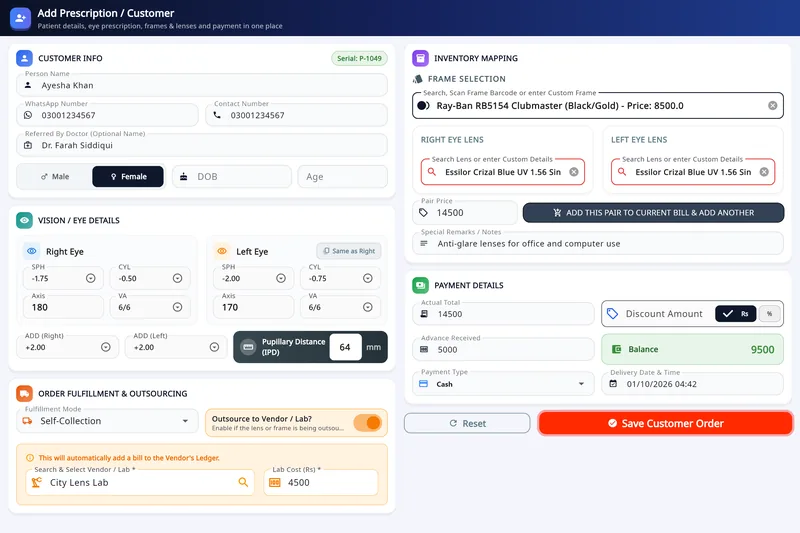
A dedicated optical shop management system also solves the inventory problem that generic software ignores. A single frame model can exist in five colours, three sizes and two bridge widths, which means a 400-frame display can represent 3,000+ stock-keeping units. Optical software keeps these as one product family with variants, so you always know exactly which colour and size is sitting on the shelf.
Asaan Optics is optical shop software for Windows 10 and 11 PCs, with an Android companion app; both use one account and the same records. It is built for optical shops in Pakistan, Saudi Arabia and the Gulf.
Key takeaways
- Built for eyewear retail, not adapted from a generic retail POS.
- Stores prescriptions in clinical format — SPH, CYL, AXIS, ADD, PRISM, PD.
- Treats frame + lens + coating + lab work as one composite order.
- Tracks stock by brand, colour, size and power — not just by product name.
- Keeps billing running when the internet drops, and syncs the saved records once you are back online.
- Handles inclusive or exclusive VAT and GST, and can print a ZATCA-format QR code for Saudi Arabia.
Asaan Optics at a glance
- Category
- Optical retail POS with prescription records
- Built for
- Opticians, optometrists, eyewear retailers, eye hospitals
- Runs on
- Windows 10 & 11 desktop, Android mobile
- Works offline
- Yes; records saved on the device sync once you are back online
- Languages
- 9, with native right-to-left layout
- Try before buying
- A 30-day free period on the desktop app
Which Optical Businesses Is Asaan Optics Built For?
The same records work for a single counter and for a shop with several branches.
Independent Optical Stores
Single-counter shops that have outgrown a paper register. Replace the khata with searchable prescription records, automatic stock deduction and WhatsApp receipts — without hiring an IT person.
Multi-Branch Optical Chains
Shops with more than one counter or branch. Staff get their own logins with screen permissions, and the owner sees every sale.
Hospital & Clinic Optical Units
Eye departments that dispense as well as diagnose. Keep clinical records separated from counter billing so optometrists and sales staff each see only what their role requires.
Lens Labs & Wholesalers
Businesses that surface and fit for other stores. Keep supplier ledgers, and a running balance for every account you serve.
Opticians Who Work On The Move
Camp-based eye clinics, mobile refraction vans and market-day setups. The Android app records prescriptions and raises bills offline, then merges everything when you are back on Wi-Fi.
Optical Startups & New Openings
Opening your first shop and want to start digital instead of migrating later. Begin on the free trial, keep the same database as you grow, and add terminals as revenue allows.
How to Choose the Best Optical Shop Software
Before you compare prices, compare these eight capabilities. A cheap licence that fails on any one of them will cost more in lost orders than the software costs in a year.
Does it store prescriptions in clinical format?
A free-text notes field is not a prescription database. The software must have separate structured fields for SPH, CYL, AXIS, ADD, PRISM and PD on each eye, so you can search, reorder and print them years later. This single requirement eliminates most generic retail POS products.
Can it bill a frame, lens and coating as one order?
An optical sale is rarely one product. Ask whether the system supports composite order processing — grouping a frame, a lens pair, an index, a coating package and lab charges into a single invoice line that still tracks each component's cost separately.
How does it model frame inventory variants?
A 400-frame display can represent over 3,000 sellable combinations once colour, size and bridge width are counted. If the software forces you to create a separate product for every colourway, your stock counts will drift within a month. Look for parent–variant matrix inventory.
Does it track lab jobs end to end?
Prescription orders move through grinding, coating, fitting and delivery — often at an outside lab. The system should hold a status for every stage, flag overdue jobs, and keep vendor ledger balances for each lab you send work to.
Will billing survive an internet outage?
Cloud-only software stops at the counter the moment your connection drops — and a queue of customers does not wait. Verify the product is offline-first: it writes locally first, then reconciles to the cloud when connectivity returns.
Are the invoices compliant where you trade?
Tax rules differ by market. Stores in Saudi Arabia need ZATCA Phase 1 and Phase 2 QR e-invoicing; Gulf and European stores need GST or VAT fields; Pakistani retailers need FBR-compatible invoices. Confirm your jurisdiction is covered natively rather than through a manual workaround.
Can you hide financial data from counter staff?
Sales staff need to create bills. They do not need to see your daily margin, expense sheet or net cash position. Role-based access control with a separate staff login is the difference between a system you can hand over and one you have to supervise personally.
What does it really cost over three years?
Compare total cost of ownership, not the headline monthly price. Add the licence, any per-terminal charge, onboarding, training and paid support, then check what happens to your data if you stop paying. Asaan Optics keeps your database yours — it does not lock you out when a subscription lapses.
Optical Shop Software vs Generic POS vs Paper Registers
Most optical stores lose money not because they lack software, but because they chose the wrong kind of software. Here is exactly where a specialised optical shop management system separates from a generic retail till and from a manual register.
| Capability | Asaan Optics | Generic Retail POS | Paper Register / Excel |
|---|---|---|---|
| Prescription storage in clinical format (SPH, CYL, AXIS, ADD, PRISM, PD) | Yes | No | Handwritten only |
| Composite orders — frame, lens, coating and lab work billed as one job | Yes | No | Separate entries, easily mismatched |
| Frame stock modelled by brand, colour, size and bridge variants | Yes | Flat SKUs only | No |
| Lab work sent to an outside vendor, with the lab cost on the vendor’s ledger | Yes | No | Job slips on paper |
| Billing keeps working during an internet or power-bank outage | Yes — offline-first | Usually cloud-only | Always works, never syncs |
| Tax settings and a ZATCA-format QR on receipts | Yes | Varies by vendor | No |
| Digital receipts delivered over WhatsApp | Yes — one click | Rarely included | No |
| Staff logins with per-screen permissions | Yes | Paid add-on, if at all | No |
| Staff accounts that hide revenue and margin from counter operators | Yes — role based | All-or-nothing access | No |
| Stock reports — top sellers, low stock, items not sold in 90 days | Yes | Generic sales reports only | Manual tallying |
| Desktop PC and mobile app sharing the same live database | Yes | Separate logins, separate data | No |
Comparison reflects standard configurations; feature availability in third-party generic POS products varies by vendor.
Optical Shop Software Glossary
The vocabulary used across every optical shop management system. If a vendor cannot handle these terms natively, the software is not built for eyewear retail.
- SPH — Sphere
- The main lens power correcting short-sightedness (minus) or long-sightedness (plus), measured in dioptres. The first value on every prescription.
- CYL — Cylinder
- The additional power correcting astigmatism, where the cornea is shaped more like a rugby ball than a football. Always paired with an axis.
- AXIS
- The orientation of the cylinder correction, expressed in degrees from 1 to 180. A lens built to the wrong axis is optically useless even at the correct power.
- ADD — Addition
- The extra plus power added in the lower half of a progressive or bifocal lens for reading and near work. Standard on prescriptions for customers over forty.
- PD — Pupillary Distance
- The distance in millimetres between pupil centres. Needed to position the optical centre of each lens in front of the eye; a wrong PD causes headaches.
- Prism
- A wedge power used to correct double vision or binocular alignment problems, recorded with both a value and a base direction.
- Transposition
- Converting a prescription between plus-cylinder and minus-cylinder notation without changing its optical effect. Labs and suppliers often require the opposite form to the one written by the doctor.
- Composite Order
- A single order that bundles a frame, a lens pair, an index, a coating package and lab charges together, while still tracking the cost and margin of each component.
- Lab Job Sheet
- The work ticket that follows a lens order through surfacing, coating, edging and fitting — usually at an external laboratory — until the finished pair comes back for delivery.
- Frame Ageing
- How long a frame has sat unsold in your display. Ageing stock ties up working capital and usually has to be discounted, so it is one of the most important reports an optical retail system can produce.
- Digital Khata
- The digital replacement for a traditional handwritten ledger. In an optical context it means customer balances, advance payments and credit orders held in software instead of a paper book.
- Optical POS
- Point of sale software adapted specifically for eyewear retail — one that understands prescriptions, lens options and lab workflow rather than treating a frame as a generic product.
- Optical EMR
- Electronic medical record for eye care. Holds refraction results, case history and follow-up visits, and is what separates a clinic-grade optical system from a plain billing tool.
- ZATCA E-Invoicing
- The Saudi tax authority's mandatory electronic invoicing standard. Phase 1 requires a QR code on the invoice; Phase 2 adds real-time integration with the tax platform.
- Offline-First
- A design where the software writes to the local machine first and syncs to the cloud afterwards, so billing never stops when the internet does. The opposite of cloud-only software.
Where to go next
- Asaan Optics DesktopThe Windows software: prescriptions, stock, sales and staff.
- Asaan Optics mobile appAndroid: Scan Prescription, repairs, quick sales.
- PricingPlans for desktop, mobile or both.
- Free optical toolsTransposition and other optical calculators.
- How to read an eye prescriptionSPH, CYL, axis, ADD, PD and prism, with worked examples.