Who wrote this, and how to read it
This page is published by Techwine Solutions, the company that makes Asaan Optics. Because one of the products below is our own, this is not an independent ranking. Nothing is numbered or placed first, and the products are listed alphabetically.
We have not installed or tested the other products. What we say about them is limited to what each maker states on its own website, read in October 2026 and linked as the source. Confirm prices and features with the vendor before you decide.
The page starts with the questions that matter most for a shop in Pakistan, because they are useful whichever product you choose.
What matters for an optical shop in Pakistan
Power cuts and internet drops are two different problems
During load-shedding a desktop PC is off unless it runs on a UPS, and no software can change that. A phone or a laptop carries on for as long as its battery lasts. The internet is a separate question: the router may be down while the PC is running, or the mobile signal may be weak.
So ask two things. What will the counter run on when the power goes? And will the software still save an order when there is power but no internet? Then ask how those saved records reach the server afterwards.
Payment in rupees, by a method you can use
Ask whether the price is charged in rupees or in a foreign currency, and how you pay: a card, a bank transfer, or the app store on your phone. A subscription billed in dollars to an international card is harder for many small shops than a rupee price paid locally. Ask for the yearly total, not only the monthly figure.
Urdu at the counter
If the people who make the bills read Urdu more easily than English, check that the program's own menus and buttons are available in Urdu, not only the printed receipt.
Thermal receipts
Most counters print on an 80 mm thermal roll, and smaller portable printers use 58 mm. Check that the software supports the roll width you have, and whether it can also print a full A4 or A5 page for customers who want one. Ask how the printer connects: through Windows on the PC, or over Bluetooth from a phone.
WhatsApp for receipts and pickup messages
Customers expect to be told on WhatsApp when their glasses are ready. Ask whether a receipt can be sent to WhatsApp, and whether messages are sent one at a time by the staff or automatically. If messages go out automatically, use a separate business number, because WhatsApp can block numbers that send messages in bulk.
The prescription and the balance
A spectacle order has a prescription for each eye, a frame, two lenses, an advance and a balance due on delivery. Software built for general shops is not designed around this, so ask the vendor to show how it would be entered and how unpaid balances are listed. The shop's khata of who still owes money should come from the software, not from a second register.
FBR requirements
If your shop is required to issue FBR-integrated invoices, ask each vendor in writing whether their product does this. Do not assume it from a feature list.
Four options, described from their makers' websites
| Product | Made for | Points the maker states | Source |
|---|---|---|---|
| Asaan Optics | Optical shops | Windows program and Android app; prescription fields per eye; works without internet; Urdu on the desktop | Asaan Optics Desktop |
| Candela RMS | General retail | Point of sale and inventory with barcodes; desktop and cloud versions; English, Urdu and Arabic; FBR integration available | candelarms.com |
| Oscar POS | Restaurants, retail and service businesses | Point of sale, inventory and payments; offline billing that syncs later; FBR integration; priced in rupees | oscar.pk |
| OptoSoft | Optical shops and chains | Web-based, with an Android point-of-sale app; prescription management; GST billing for India; yearly price per store | optosoft.in |
Asaan Optics
This is our own product, so read this part as the maker's description. Asaan Optics is a Windows program for the counter PC and an Android app for the phone, on one shop account. The order form takes the prescription for both eyes, the frame and lenses, the advance and the delivery date, and the customer list can be filtered by balance to show who still owes money.
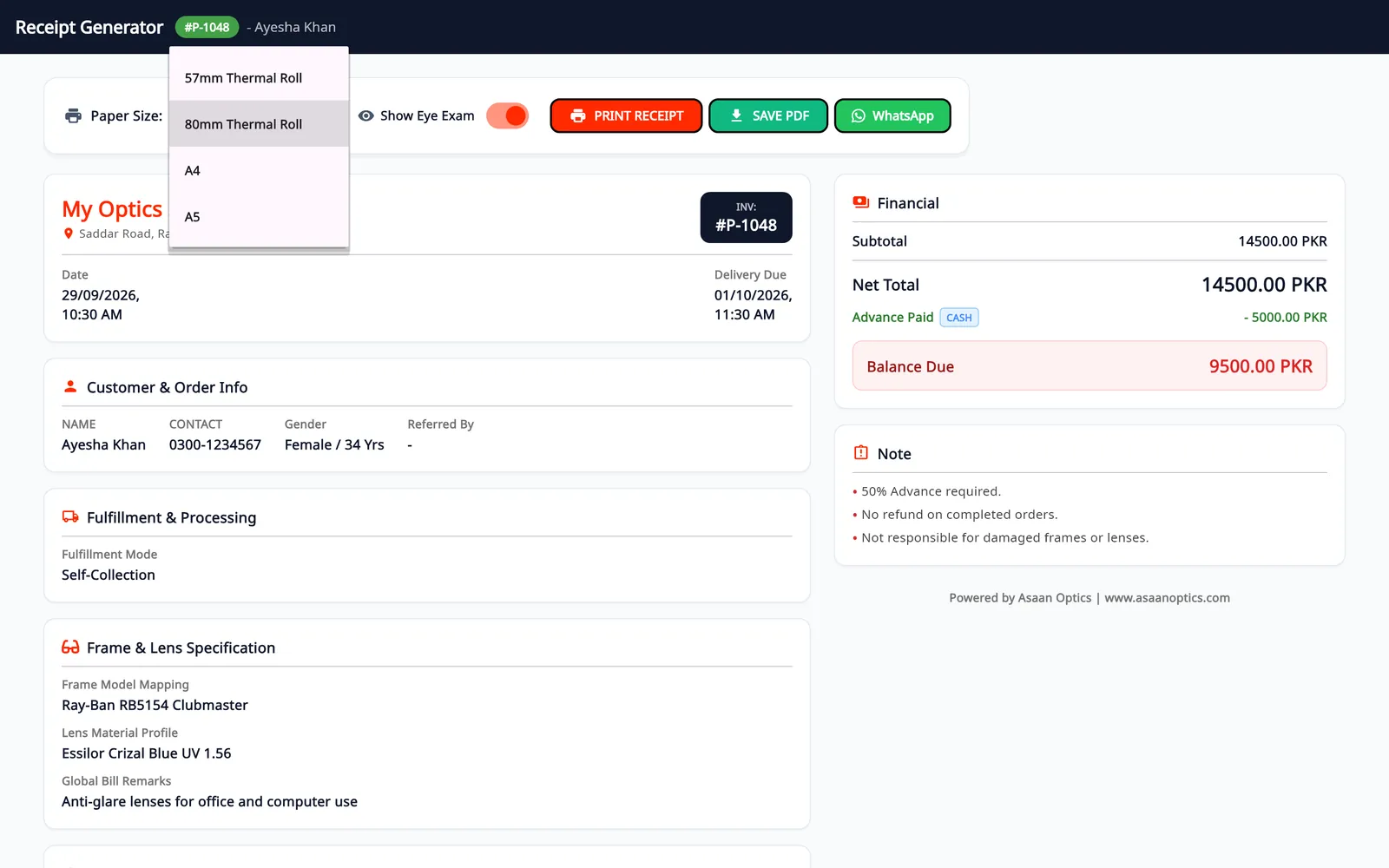
How it answers the questions above:
- No internet: the desktop keeps billing and holds unsent records in a queue on the PC; you send them with the Pending Sync button when the connection is back. The Android app saves prescriptions, repairs and sales on the phone and syncs when it reconnects.
- No power: the Android app runs on the phone's battery. The desktop needs a powered PC like any other Windows program.
- Urdu: the desktop program offers Urdu in its language picker, with a right-to-left layout.
- Receipts: the desktop prints on 57/58 mm and 80 mm thermal rolls, A4 and A5, through any printer installed in Windows. The phone prints 80 mm receipts through Android's print dialog and saves A4 PDFs. The thermal printer guide has the setup steps.
- WhatsApp: receipts can be sent on WhatsApp from both apps. Once the shop's number is linked, order confirmation, ready-for-pickup and repair messages can go out automatically.
- Payment: the pricing page shows the price for your region. The Android plan is paid through Google Play. For the desktop plan we send payment details on WhatsApp.
Its limits: there is no iPhone, Mac or browser version. Stock is managed on the desktop, not on the phone. Stock is one list per account and is not kept separately per branch. Its pages describe tax settings on receipts but do not describe FBR point-of-sale integration, so ask us first if you need that.
Candela RMS
Candela RMS is made by LumenSoft Technologies in Lahore. Its website describes a barcode-based point of sale and inventory system that comes in desktop and cloud versions, handles several stores, and is available in English, Urdu and Arabic. The sectors it lists are clothing, footwear, grocery, pharmacy, restaurants, salons and bookshops; optical shops are not on that list. LumenSoft states that FBR integration is available. Prices are not published; the site offers a demo. If you consider it for an optical shop, ask how a prescription and a frame-plus-lenses order would be recorded. Source: candelarms.com.
Oscar POS
Oscar describes its product as point of sale, inventory and payments in one system, for restaurants, retail shops such as clothing and grocery, and service businesses such as salons and pharmacies. Its website says billing continues when the internet is down and syncs afterwards, that it has FBR integration, and that it is priced in rupees. We did not find a price list on the pages we read. Optical shops and prescriptions are not mentioned, so ask the same question as for any general point of sale. Source: oscar.pk.
OptoSoft
OptoSoft is optical-specific software from India. Its website describes web-based billing, prescription management, customer follow-up through WhatsApp, barcode inventory and multi-store management, plus an Android point-of-sale app. Its billing is built around Indian GST, and its pricing page quotes a yearly fee per store in Indian rupees for India and in US dollars for other countries. A shop in Pakistan should ask about payment method, tax settings and support hours. Source: optosoft.in.
Questions to ask any vendor
- If the internet drops during a sale, can I still save the order and print the receipt? How does the record reach the server later?
- Where does a prescription go: separate fields for each eye, or a notes box?
- Can one bill hold a frame, two lenses, an advance and a balance?
- Which paper sizes can it print, and on which printers?
- Is the program itself available in Urdu?
- What is the yearly cost in rupees, including setup and training, and how do I pay?
- If I stop paying, do I keep access to my customer records?
- If I need FBR-integrated invoices, does the product issue them?
For a wider checklist that is not specific to Pakistan, see the optical shop software guide. For a comparison with products used in other countries, see five optical shop software options compared.
Try before you pay
Whichever product you lean towards, use its trial or demo with one real order from your own shop, on your own printer, with the internet switched off for a few minutes.
For Asaan Optics, the desktop program is free for its first 30 days, and the Android app keeps a free allowance of 30 entries every 30 days. The pricing page explains both.
Questions
- Is this an independent ranking of optical software in Pakistan?
- No. Asaan Optics is made by Techwine Solutions, which also publishes this page. The products are listed alphabetically and not ranked, and the notes on the other products come from their makers' own websites, checked in October 2026.
- Will the software keep working during load-shedding?
- Software cannot run on a PC that has no power, so a counter PC needs a UPS or a laptop battery. What software can do is keep working without internet. Asaan Optics saves new records on the PC or the phone while the connection is down and sends them afterwards; on the desktop you press Pending Sync, and the Android app syncs when it reconnects.
- Can I send receipts on WhatsApp from Asaan Optics?
- Yes. A receipt can be sent to the customer on WhatsApp from the desktop program and from the Android app. After you link the shop's WhatsApp number, order confirmation, ready-for-pickup and repair messages can also go out by themselves. A dedicated business number is recommended.
- Is Asaan Optics available in Urdu?
- Yes. The desktop program offers Urdu in its language picker and switches to a right-to-left layout. The other desktop languages are English, Arabic, Spanish, French, Portuguese, Turkish and Hindi.
- Does Asaan Optics connect to FBR?
- Its pages describe a tax label, rate and registration number on receipts, with prices inclusive or exclusive of tax. They do not describe FBR point-of-sale integration. If your shop is required to be integrated with FBR, confirm this with any vendor, including us, before you rely on it.
More from the blog
- Optical shop billing app and management software: how a bill is made in Asaan Optics
- Optical shop management software free download: what is free and what is paid
- How to Digitize Your Optical Store: From Paper Register to Software
- How to Manage Optical Inventory: Frames, Lenses and Contact Lenses
Reference guides and free calculators: Resources and optical tools.